- project oriented? the participants learn skills in the context of how to put them together to create a final peice
- skills? kinda like a cook book or how-to-improve-your...(golf swing)
Thursday, October 12, 2006
PPT in the Classroom
What kind of course will this be?


Wednesday, October 11, 2006
EVO 2007 Moderators Week 1
Well, I finished all the tasks up to this week.
- Pre-Training
- read the "How EVO Differs" article
- filled out the Needs Assessment Survey
- joined the EVO Moderators YG site
- read the Netiquitte article
- took the Netiquitte online quiz
- Week 1
- already had a YahooID
- introduced myself to the group
- uploaded a picture of myself
- set my membership options
- crap... I just realized that I need to post my comments on the "How EVO Differs" article... guess I'm not done yet
- Check out the Advanced PPT module and reply to Sandy
Internet Banner Project
Useful how-to's:
This is supposed to be a project-oriented class. Present skills as a means to an end. Never throw skills at them "out-of-context".
I jumped right into things and it was a lot for them. Think of warming up with more activities.
- change stage size
- make a motion tween
- add/manage layers
- structured
- banner project skills
- delete backgrounds
- find graphics
- make documents
- semi-structured
- re-create a banner
- free
- make your own banner
This is supposed to be a project-oriented class. Present skills as a means to an end. Never throw skills at them "out-of-context".
I jumped right into things and it was a lot for them. Think of warming up with more activities.
- What is a banner?
- Choose some favorite banners? (difficult printing or saving those examples)
Flash 8 reference material
For next year, who ever is teaching this class might do better with a textbook that can serve as a reference for students while they are working on their projects. Currently, I'm creating all of my class materials and though it offers me flexibility with the content and design, it's difficult to develop something that will cover all my bases this first time around.
Saturday, October 07, 2006
EV Online 2007
I was recently honored with an invitation to join the Electronic Village Online six week session on using PowerPoint in the Classroom.
At this point there are a few things I need to do to prepare for the October 8th Moderators' Training Session.
The EVO Training Wiki
At this point there are a few things I need to do to prepare for the October 8th Moderators' Training Session.
- read through a heap of emails to catch up on the chatter
- post a bio on the wiki
- join the YahooGroup for moderators
The EVO Training Wiki
Wednesday, October 04, 2006
だめ! Don't do it!
I found myself in a little bit of an ethical quagmire the other day with a student in one of my computer classes.
I was going through the students' "home folders" on the network to retrieve assignments from the previous week and found some dangerously offensive material stored there. I don't use those adjectives lightly.
I didn't know exactly what to do because I'm not officially authorized to directly access the students' home folders... however any teacher on the network has open access to them as well as materials stored by other teachers. The access is a little convoluted, but nothing is secured. It's truely an open network.
I have no idea what the decency laws are in Japan or at this school for that matter. He might have been disciplined, suspended, expelled, or even arrested. I have no idea.
After consulting another teacher confidentially about the matter, I decided that it would be best that I delete the materials and speak to the student without reporting the incident to the administration. (I'm mostly using "I" in the sense that I'm taking full responsibility for what might happen).
When I approached the student he didn't know what I was talking about at first. He only gave a slight indication of knowing at the end of the conversation. I addressed him as the adult he is, but let him know sternly that it cannot happen again.
He came up to me later and let me know that he did know what I was talking about, language barrier and all, and that it had happened a long time ago and was a joke. Mostly that he felt ashamed. And I'm going to take him on his word.
Students need to be educated about the perilous nature of freedom. I love America for the freedoms we have: speech, religion, even firearms.
I don't think the Japanese fully understand the concept of those freedoms at times. I don't think that I or some of my fellow Americans understand that fact either at times.
We have to pay a price for freedom. Is that price ever too high? Ask those grieving Amish folks, or others who've suffered from recent acts of violence in America. I would like to say "no", but I know that that feeling is probably circumstantial.
So, back to my student. I think this reinforces my role as an educator deeply committed to technology in the class room is to address media literacy in my classes. About how to do that... well that's another post.
I was going through the students' "home folders" on the network to retrieve assignments from the previous week and found some dangerously offensive material stored there. I don't use those adjectives lightly.
I didn't know exactly what to do because I'm not officially authorized to directly access the students' home folders... however any teacher on the network has open access to them as well as materials stored by other teachers. The access is a little convoluted, but nothing is secured. It's truely an open network.
I have no idea what the decency laws are in Japan or at this school for that matter. He might have been disciplined, suspended, expelled, or even arrested. I have no idea.
After consulting another teacher confidentially about the matter, I decided that it would be best that I delete the materials and speak to the student without reporting the incident to the administration. (I'm mostly using "I" in the sense that I'm taking full responsibility for what might happen).
When I approached the student he didn't know what I was talking about at first. He only gave a slight indication of knowing at the end of the conversation. I addressed him as the adult he is, but let him know sternly that it cannot happen again.
He came up to me later and let me know that he did know what I was talking about, language barrier and all, and that it had happened a long time ago and was a joke. Mostly that he felt ashamed. And I'm going to take him on his word.
Students need to be educated about the perilous nature of freedom. I love America for the freedoms we have: speech, religion, even firearms.
I don't think the Japanese fully understand the concept of those freedoms at times. I don't think that I or some of my fellow Americans understand that fact either at times.
We have to pay a price for freedom. Is that price ever too high? Ask those grieving Amish folks, or others who've suffered from recent acts of violence in America. I would like to say "no", but I know that that feeling is probably circumstantial.
So, back to my student. I think this reinforces my role as an educator deeply committed to technology in the class room is to address media literacy in my classes. About how to do that... well that's another post.
Wednesday, September 27, 2006

Tatsuya's project
Tatsuya is a 5th year student working on his graduation project. He is going to use Flash to create an interactive presentation about New Zealand with a focus on exploring English. He's asked me to help and I was glad to offer my help, but I don't know if I can be of much use to him. He wants to do a lot of action script writing, but he's frankly way ahead of me.
I guess I'd better start studying action script quickly.
I guess I'd better start studying action script quickly.
Tuesday, September 26, 2006
Audio project wrap-up
I gave the kids the first period (45 minutes) to finish their musical compositions. I doubt any of them finished their work, but that's alright. I didn't have a very clear idea of how I was going to assess their remixing skills and now I'm left with a problem. The kids spent 135 min on their projects and I can't easily grade them. How would you (quantitatively) grade a project like this?
I had then planned on letting them answer three questions based on the project and had them answer by posting responses on their class website. Unfortunately, a lot of them lost their questions and had problems with posting their responses. The problem could have stemmed from their servers, our internet connections, or the laptops. Next time, have the Ss open WordPad or someother text editor and copy and paste their responses when they were finished. That way if they weren't able to finish, they could just save the file in the (Y:/) drive.
 I showed them a "real-world" example of remixing, ala DJ Q-bert. Unfortuately I didn't have the time to run through the listening exercise. I guess I can save that for next week, when I start the next unit of their semester: photographing? Where am I taking this class?
I had then planned on letting them answer three questions based on the project and had them answer by posting responses on their class website. Unfortunately, a lot of them lost their questions and had problems with posting their responses. The problem could have stemmed from their servers, our internet connections, or the laptops. Next time, have the Ss open WordPad or someother text editor and copy and paste their responses when they were finished. That way if they weren't able to finish, they could just save the file in the (Y:/) drive.
 I showed them a "real-world" example of remixing, ala DJ Q-bert. Unfortuately I didn't have the time to run through the listening exercise. I guess I can save that for next week, when I start the next unit of their semester: photographing? Where am I taking this class?
Monday, September 25, 2006
Flash Applications
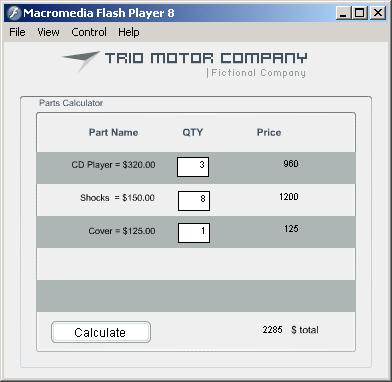
Looking at the tutorial files for creating a Flash application, I had the idea of making one to provide grading based on a curve. Currently I'm using a Texas Instruments 82, or something like that, to do my grading stats. It would be wicked cool if I could make an application to handle those stats instead.
Saturday, September 23, 2006
Flash resource extractor
I'm looking to find software that will allow me to extract vector art, images, sounds, etc. so that I can use them in my classes. It would make my job a hell of a lot easier, allowing me to "borrow" professional level stuff for my lessons. I think this would help intrinsically motivate the Ss by offering them interesting components to use in their projects.
Here are some possibilities:
Here are some possibilities:
Friday, September 22, 2006
Family ties
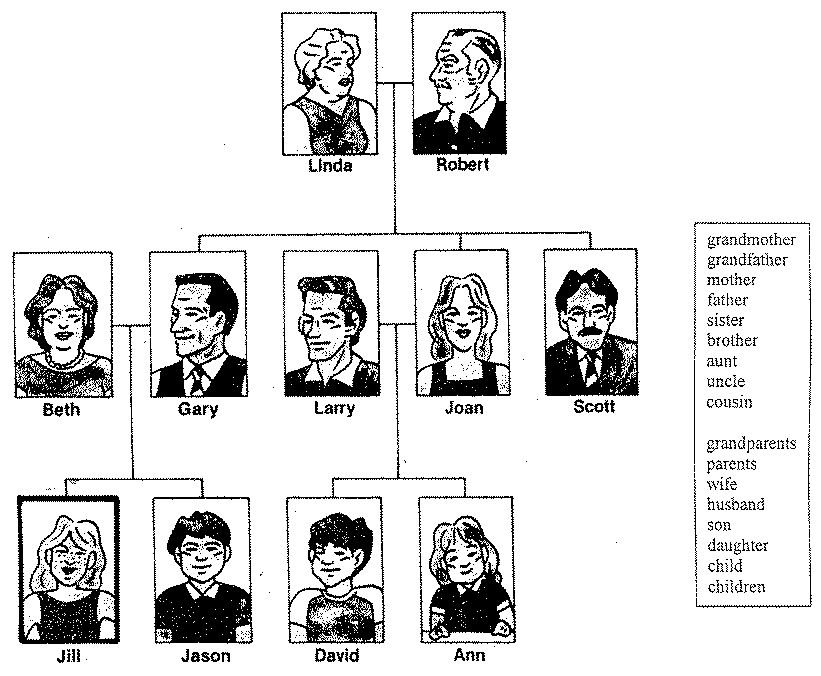
Bruce was talking about using cards and having the Ss make family trees. I was thinking that Ss could work in pairs to construct a family tree together by following an example made on the board or possibly with PowerPoint.
The teacher would have magnetic pictues of different family members and they would be put on the board sequentially while eliciting responses from the class regarding their title.
This would be a good first day activity. Go over the question forms as well:
- How many ___ does she have?
- Who is her ___?
Thursday, September 21, 2006
This week's gotta do!
- have Flash installed on computer 4
- can Flash import audio on laptops?
- ask to have newest version of Quicktime and Windows Media Player installed in the lab
Next Flash tweening project
What am I gonna do?
Last week wasn't a total waste, but it sure could have been better.
I showed them the basics of tweening:
Well, I can try again to use Captivate to make a quiz. I know that it can do it, but I'm not convinced how well it can record and send scores to me.
As for the project...

Have the Ss create an animated web banner. Check average web banner sizes. Think of content. Banners are used to advertise something. It let's people know about something that is going to happen or something that people should buy. Find examples of banners. Can you download them? I guess you can simply show them using the web. You'll have to make a banner advertising something as well. What about links?


What is a symbol?
What can you motion/shape tween?
Last week wasn't a total waste, but it sure could have been better.
I showed them the basics of tweening:
- frame animation vs. tweening
- what is tweening
- position, size, rotation, and skew tweening
- motion path guide layers
- color tweening
- symbols, shapes, etc.
Well, I can try again to use Captivate to make a quiz. I know that it can do it, but I'm not convinced how well it can record and send scores to me.
As for the project...
- motion & shape tweening
- text
- imported objects
- student designed objects
- layer management
- at least three seconds in length
- create a Flash movie that runs for 30 seconds
- combine their skills using motion tweening of position, size, rotation, skew, easing of shapes, graphics, and text to animate objects in their movie
- set custom motion path guides in their movie to describe how objects should move around the canvas
- animate color and shape changes using shape tweening
- compose a project based on some kind of concept that improves the Ss English skills
Have the Ss create an animated web banner. Check average web banner sizes. Think of content. Banners are used to advertise something. It let's people know about something that is going to happen or something that people should buy. Find examples of banners. Can you download them? I guess you can simply show them using the web. You'll have to make a banner advertising something as well. What about links?
What is a symbol?
What can you motion/shape tween?
- shapes
- text
- lines
- movies
- graphics
- buttons
Horrible lesson plan
I ran through "tweening" with my fifth year computer class yesterday. It's one of the coolest parts of working with Flash and arguably one of the most important. Yet, all I had them working with were circles and squares. The materials didn't even cover shape tweening, although I had them do some of that as well.
Next time, I gotta find some cool objects for them to work with. Better examples and more structured worksheets. I'm really not happy with my walk-thru's, but that's for a different day.
Next time, I gotta find some cool objects for them to work with. Better examples and more structured worksheets. I'm really not happy with my walk-thru's, but that's for a different day.
Tuesday, September 19, 2006
Looking back
Wow, it's been almost a year since I've contributed to this blog. It get's hard to juggle all of my blogs around. They are useful though.
I'm just about to begin working on the music video PowerPoint projects with my fourth year computer class. I'm looking forward to seeing what this year's group will do.
I've begun a new class with the Computers and English fourth year class. A challenging, but fun class to say the least. We're working on remixing audio loops right now to learn about expression through sound. It's expectedly taken longer than I initially had planned for.
The fifth year computer guys are working on Flash projects using the new Pro version 8. We're only just scratching the surface in this class.
I'm just about to begin working on the music video PowerPoint projects with my fourth year computer class. I'm looking forward to seeing what this year's group will do.
I've begun a new class with the Computers and English fourth year class. A challenging, but fun class to say the least. We're working on remixing audio loops right now to learn about expression through sound. It's expectedly taken longer than I initially had planned for.
The fifth year computer guys are working on Flash projects using the new Pro version 8. We're only just scratching the surface in this class.
Monday, October 03, 2005
JALT Presentation materials - arrrgg!
 Doreen and I have been cranking on pulling materials together for our JALT presentation this weekend in Shizuoka. I'm keeping my fingers crossed that it'll all go through well enough. There's a sizable list of things that can potentially go wrong.
- The song doesn't play back in the presentation
- Presentation CD's come out as coasters
- My projector dies
- Computer problems, etc.
Friday, September 30, 2005
No example?
I didn't finish an example for my 5th year computer class! I should have provided them with an accurate example of what I am expecting from them so they had something to use as a point of reference. I don't want them copying the example, but they deserve something more to look at than me trying to pass off a PowerPoint presentation for their Flash project.
I'm going to have to figure a way to make tutorials for them so that they can complete certain tasks. It's very difficult to make handouts since the Ss are using a localized version of Flash MX while I'm using an English version of Flash MX 2004. It's all very confusing.
I'm going to have to figure a way to make tutorials for them so that they can complete certain tasks. It's very difficult to make handouts since the Ss are using a localized version of Flash MX while I'm using an English version of Flash MX 2004. It's all very confusing.
How much do they understand?
 I had a difficult time with my 4th year students understanding the assignment for the day. The didn't seem to understand what it was they were supposed to do, nor how to complete some of the initial steps.
I had shown them multiple examples of PowerPoint presentations that featured "new vocabulary" slides.
- They knew about finding the lyrics,
- they knew that there were words in their songs they didn't understand,
- they knew how to find the meanings of these words online,
- they knew how to make new PowerPoint documents,
- but they didn't know how to take one of the words in their lyrics and copy and paste that word along with its meaning in Japanese into the PowerPoint document.
Thursday, September 29, 2005
Problems with the Computer Lab Audio
 I just found out that I can't play certain audio file types on the laptops in rm117. I tried to play a PowerPoint with a WMA encoded at 960kbps and didn't get any sound out. It must have to do with the version of Windows Media Player. I'll have to check on that later, not that I'll be able to update the versions on those computers.
I also noticed that I have to be careful about which images I choose for my class blogs since not all will appear on those laptops (see example).
Note: next year, have the guys make their own (laminated) mouse pads; I hope the guys remember to bring their headphones in tomorrow!
Subscribe to:
Posts (Atom)