Well, I've just had the last class of the semester with my C4 class.
I still feel like the class is a bit unwieldly topping out at 19 mixed-ability language learners. I do feel like the rapport has improved and I'm not as intimidated by them as I felt last semester.
I think I'll start off the next semester with a survey and will try to change the nature of the class based on some of their feelings.
So, we just finished a "short" unit on audio commercials.
Next time:
It would be great if everyone had headphones and a primer on how to use Audacity to record.
It would also be a good idea to organized the order of the recordings if a "single" recording studio is used. The students should know that some of them would have to record out of class time if necessary.
This unit should have stretched about four classes looking at improving speaking skills like intonation and pronunciation.
We had a good time with tongue twisters and expressive practice, but the Ss we still a little apprehensive to "act" in front of their peers. I on the other hand am quite comfortable with goofing off with them.
Showing posts with label lesson planning. Show all posts
Showing posts with label lesson planning. Show all posts
Tuesday, November 14, 2006


Wednesday, October 11, 2006
Internet Banner Project
Useful how-to's:
This is supposed to be a project-oriented class. Present skills as a means to an end. Never throw skills at them "out-of-context".
I jumped right into things and it was a lot for them. Think of warming up with more activities.
- change stage size
- make a motion tween
- add/manage layers
- structured
- banner project skills
- delete backgrounds
- find graphics
- make documents
- semi-structured
- re-create a banner
- free
- make your own banner
This is supposed to be a project-oriented class. Present skills as a means to an end. Never throw skills at them "out-of-context".
I jumped right into things and it was a lot for them. Think of warming up with more activities.
- What is a banner?
- Choose some favorite banners? (difficult printing or saving those examples)
Wednesday, September 27, 2006

Saturday, September 23, 2006
Flash resource extractor
I'm looking to find software that will allow me to extract vector art, images, sounds, etc. so that I can use them in my classes. It would make my job a hell of a lot easier, allowing me to "borrow" professional level stuff for my lessons. I think this would help intrinsically motivate the Ss by offering them interesting components to use in their projects.
Here are some possibilities:
Here are some possibilities:
Friday, September 22, 2006
Family ties
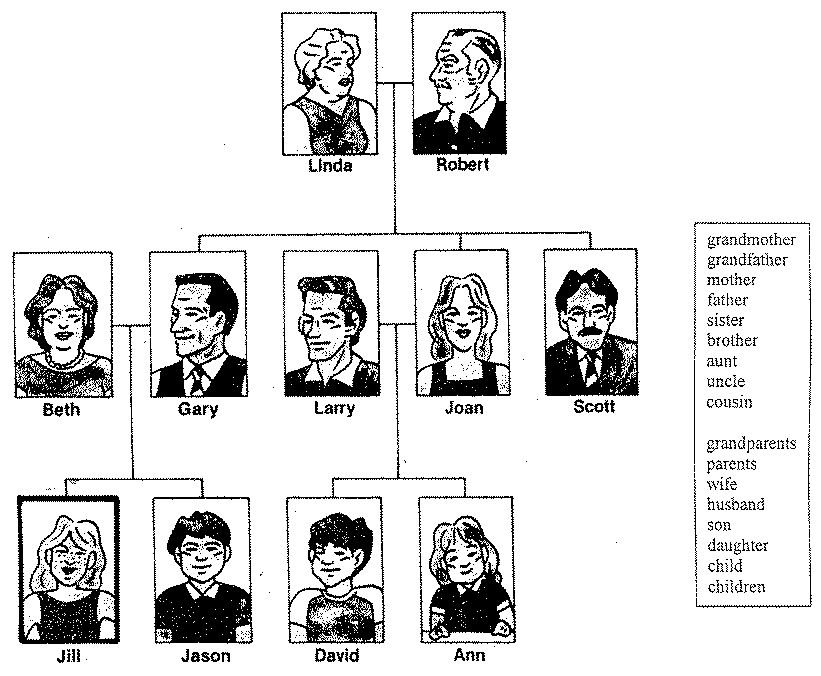
Bruce was talking about using cards and having the Ss make family trees. I was thinking that Ss could work in pairs to construct a family tree together by following an example made on the board or possibly with PowerPoint.
The teacher would have magnetic pictues of different family members and they would be put on the board sequentially while eliciting responses from the class regarding their title.
This would be a good first day activity. Go over the question forms as well:
- How many ___ does she have?
- Who is her ___?
Thursday, September 21, 2006
Next Flash tweening project
What am I gonna do?
Last week wasn't a total waste, but it sure could have been better.
I showed them the basics of tweening:
Well, I can try again to use Captivate to make a quiz. I know that it can do it, but I'm not convinced how well it can record and send scores to me.
As for the project...

Have the Ss create an animated web banner. Check average web banner sizes. Think of content. Banners are used to advertise something. It let's people know about something that is going to happen or something that people should buy. Find examples of banners. Can you download them? I guess you can simply show them using the web. You'll have to make a banner advertising something as well. What about links?


What is a symbol?
What can you motion/shape tween?
Last week wasn't a total waste, but it sure could have been better.
I showed them the basics of tweening:
- frame animation vs. tweening
- what is tweening
- position, size, rotation, and skew tweening
- motion path guide layers
- color tweening
- symbols, shapes, etc.
Well, I can try again to use Captivate to make a quiz. I know that it can do it, but I'm not convinced how well it can record and send scores to me.
As for the project...
- motion & shape tweening
- text
- imported objects
- student designed objects
- layer management
- at least three seconds in length
- create a Flash movie that runs for 30 seconds
- combine their skills using motion tweening of position, size, rotation, skew, easing of shapes, graphics, and text to animate objects in their movie
- set custom motion path guides in their movie to describe how objects should move around the canvas
- animate color and shape changes using shape tweening
- compose a project based on some kind of concept that improves the Ss English skills
Have the Ss create an animated web banner. Check average web banner sizes. Think of content. Banners are used to advertise something. It let's people know about something that is going to happen or something that people should buy. Find examples of banners. Can you download them? I guess you can simply show them using the web. You'll have to make a banner advertising something as well. What about links?
What is a symbol?
What can you motion/shape tween?
- shapes
- text
- lines
- movies
- graphics
- buttons
Subscribe to:
Posts (Atom)